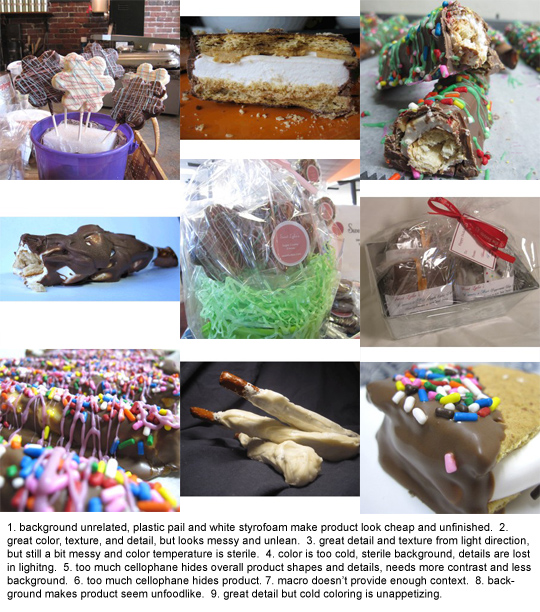
It starts with a custom made marshmallow, sandwiched by graham crackers, cookies, or dipped onto a pretzel, and then wrapped in a blanket of chocolate. Yum! We want it to look just as fun and tasty as it sounds!

Here are the techniques I shared to help improve her product photos:
• Create a mini scene with complementary objects to provide context for the product use & to suggest a relationship that attracts the ideal buyer. In the circumstance above, we paired a sentimental box with stamps to suggest sending a food gift to someone sentimental far away. In the second photo, we used a small basket and a fresh cut flower with mason jar to suggest taking some along for a picnic.
• Use soft natural light, preferably in open shade but close to an open light source like a window or door. The images above were taking in a hallway next to a large window of light in the afternoon.
• Use complementary colors to make products stand out rather than blend in. We used greens to help offset the pinks in the first image and then the pink flower in the second image to provide contrast to the brown, but also to create a relationship with the sprinkles.
• White balance for a warmer tone when photographing food (on a point & shoot camera, this often involves changing the "AWB" to Shade or Sun). Warm colors make food look healthy and nutritious. Blue tones make it look moldy or old.
• Step back and zoom in to provide accurate object size comparisons and to compress background scenery to a minimum. Zooming in helps narrow your background so that you don't have as much competition for attention in your product scene.
• Make adjustments in Photoshop or iPhoto, or whatever program you have, to enhance brightness and contrast for a little extra detail and clarity. Extra contrast helps provide sharpness and clarity, as long as it isn't taken too far, which could result in something looking fake. Brightness will help bring out details and textures.
While I know we can create more amazing images with studio lighting and/or professional cameras and lenses, it's not always practical for today's crafters and entrepreneurs who are working with limited budgets and time. A basic photographic understanding of how to make a product look more appealing can really make a difference in online sales, which hopefully translates into more people making a living doing what they love, which ends up creating a greater sense of peace and happiness in the world! ("Some say I'm a dreamer, but I'm not the only one.")